Phone and tablet play
Crazy Cattle 3D Mobile: Play on iPhone and Android
The original is PC only, so play this free Crazy Cattle 3D mobile sheep battle royale in your phone browser, no app needed.
- Free
- No download
- Touch controls
- Crazy Cattle 3D mobile on iPhone and Android
Play Online
Experience Crazy Cattle 3D instantly in your browser - no download required!
Built for touch screens. Turn your phone sideways for the best view.
Ready to bonk some sheep?
Sheep Bonk Arena loads only after you press play. The joystick and BONK button appear on your screen.
Touch: drag on the left to move, hold BONK on the right to charge, pinch to zoom. On a keyboard: WASD to move, hold and release spacebar to bonk.
Can You Play Crazy Cattle 3D Mobile?
Short answer: not the original, but you can play a Crazy Cattle 3D mobile game right on this page. The original Crazy Cattle 3D by anna is a download for Windows, macOS and Linux on itch.io. There is no official phone version, so Crazy Cattle 3D iOS and Crazy Cattle 3D Android searches usually end at copies or videos. The table shows what really works for Crazy Cattle 3D mobile play today.
| Version | Windows, Mac, Linux | iPhone and Android |
|---|---|---|
| Original Crazy Cattle 3D (itch.io) | Yes, download | No |
| Classic browser version | Yes | Needs a keyboard |
| Sheep Bonk Arena (this page) | Yes | Yes, touch |
Sheep Bonk Arena is our own fan game inspired by Crazy Cattle 3D and not made by its creator. It keeps the same idea as the original: bonk every other sheep off the island and be the last one standing. That makes it the closest thing to Crazy Cattle 3D mobile you can play in a browser. It was built for Crazy Cattle 3D mobile play from the start, with touch buttons instead of a keyboard.
How Do the Touch Controls Work?
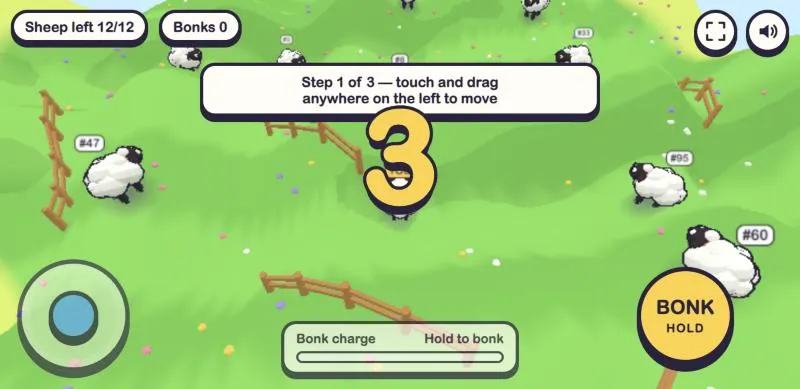
Crazy Cattle 3D mobile controls use two thumbs. The first round walks you through it in three steps.
- 1
Move: Touch and drag anywhere on the left side of the screen. A joystick appears under your thumb.
- 2
Bonk: Hold the BONK button on the right to charge, aim with your left thumb, then release to launch into a rival.
- 3
Zoom: Pinch with two fingers to zoom the camera in or out. The camera follows your nearest target.
That is all you need for Crazy Cattle 3D mobile rounds. The charge bar at the bottom shows how strong your next bonk will be. A full charge sends a sheep much further, but you stand still while you charge, so charge where nobody can hit you from the side.
Is There a Crazy Cattle 3D App?
The original creator publishes the game on itch.io for computers. Apps with the same name in phone app stores come from other developers, so check the developer name against the itch.io page before you install any Crazy Cattle 3D app. If you only want a quick round on your phone, you do not need an app at all: Sheep Bonk Arena opens in Safari or Chrome and starts in a few seconds. For most people this is the easiest Crazy Cattle 3D mobile option: no store, no account, no install.
Tips for Better Crazy Cattle 3D Mobile Rounds
- Turn your phone sideways. The game offers a landscape fullscreen button, and landscape gives you more room to see incoming sheep.
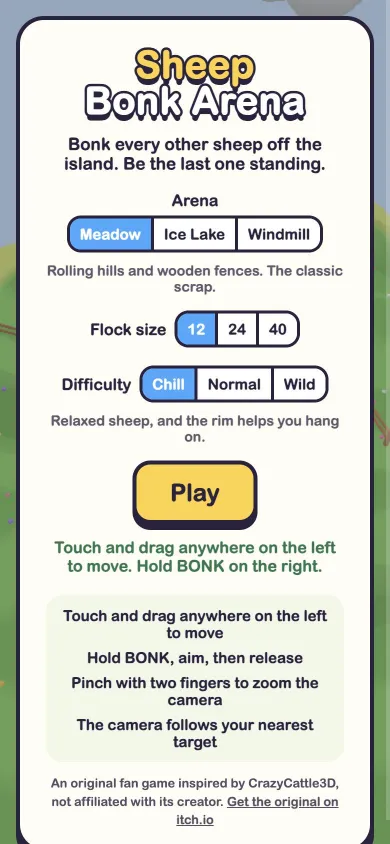
- Start with 12 sheep on Chill. Move up to 24 or 40 sheep and Normal or Wild once the controls feel natural.
- Pick an arena that suits you: Meadow has hills and fences, Ice Lake is hard to stop on, and on Windmill the spinning arms fling sheep.
- Close other apps and tabs if Crazy Cattle 3D mobile play stutters. Older phones run better with a smaller flock.
- Use the fullscreen and sound buttons in the top right corner of the game.
How We Tested Crazy Cattle 3D Mobile Play
On November 11, 2026 we played Sheep Bonk Arena in a phone-sized browser in portrait (390 by 844) and landscape (740 by 360). We checked the Crazy Cattle 3D mobile start menu, the landscape prompt, the three-step touch tutorial and a full round on Meadow with 12 sheep. Limits: this is not the original game, there is no online multiplayer yet, and very old phones may drop frames with 40 sheep.
Crazy Cattle 3D Mobile FAQ
Is Crazy Cattle 3D on iPhone?
There is no official Crazy Cattle 3D iOS version. On an iPhone, open this Crazy Cattle 3D mobile page in Safari and play Sheep Bonk Arena with touch controls.
Can I play Crazy Cattle 3D on Android?
Not the original. For Crazy Cattle 3D Android play, open this page in Chrome and start a round. Nothing is installed on your phone.
Can I play Crazy Cattle 3D on phone for free?
Yes. Crazy Cattle 3D on phone through this page is free, with no sign-up. Crazy Cattle 3D mobile play here costs nothing. The page shows ads to keep the game free.
Is the classic browser version playable on mobile?
The classic version was made for a keyboard and mouse, so we recommend a computer for it. For Crazy Cattle 3D mobile play, use Sheep Bonk Arena on this page.
Will my progress be saved on my phone?
Crazy Cattle 3D mobile rounds are short and there are no levels to earn, so there is no progress to lose. Your phone browser remembers your last arena and difficulty, and you skip the tutorial once you finish it.
Play More Crazy Cattle 3D
On a computer, play Crazy Cattle 3D on the home page, play the Crazy Cattle 3D unblocked classic version, or get the original from the Crazy Cattle 3D download guide.